
Facebook Reels Download With FvidGo
- No Ads
- 100% Free & Safe
- 1080p


Facebook Reels downloader that keeps the original vertical 9:16 frame, so take the MP4 or just the MP3.
How to Download Facebook Reel

Step 1: Copy Reel Link
To download FB Reel content, open Facebook and find the Reel you want. Tap the Share button and select Copy Link to copy the Reel URL.
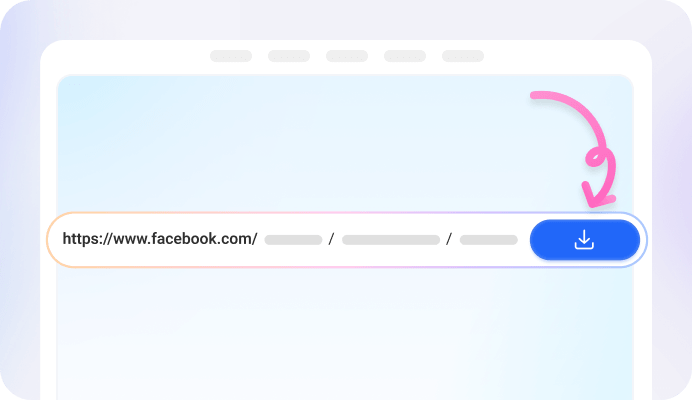
Step 2: Paste into FvidGo
Open FvidGo, paste the copied Reel link into the homepage search box, and click download. The tool instantly analyzes the link and prepares secure options without requiring login or installation.

Step 3: Choose Video or Audio
After processing, choose your format: download the full Facebook Reel as an MP4 video, or extract its viral background music as an MP3.
Add FvidGo to Home Screen

Face Reels Download: The FvidGo Advantage
Instant Video Preview
Facebook Reels Video Download in Gallery - Save Directly
Full-Screen Vertical HD
High-Quality Audio Extraction
FB Reels Download: The Real Benefits of Saving Reels Offline
FB Reel Download for Smooth Offline Playback
Facebook Reels Download Private or Public: Your Permanent Inspiration Library
Sharing with Friends
Download Facebook Reels and Edit Instantly: The Content Creator's Choice
FB Reels Download MP4 and MP3: Universal Formats
Facebook Reel Download HD Free: Native Resolution
Facebook Reels Download Without Watermark: Clean & Editable
Facebook Reels Downloader: FAQ
Does FvidGo support batch downloading for Facebook Reels?
No. This FB Reels downloader handles one Reel at a time, because the input box only accepts a single link per download. That said, if a single link resolves to multiple videos, those can be downloaded together in one batch. And since each Reel is processed in just a few seconds, you can simply paste the next link right after one finishes—downloading several Reels one after another still only takes a couple of minutes.
Will the video quality drop after downloading?
No. FvidGo extracts the original file from the Reel source, so the quality remains the same as the uploaded video. Users can often choose between SD and HD options, ensuring that videos downloaded from FB Reels maintain excellent clarity.
Can I download just the music from a Reel?
Yes. FvidGo allows users to extract the audio from a Reel and download it as an MP3 file. This feature is useful for saving trending music, voiceovers, or sound effects that you want to reuse or keep for inspiration.
Will the download be in vertical 9:16 format?
Yes. The downloaded video keeps the original 9:16 vertical format used by Facebook Reels. This means the video will display perfectly on smartphones without cropping or adding black bars on the sides.
Can I use FvidGo on my iPhone?
Yes. This FB Reel downloader online works on all devices, including iPhone, Android, Windows, and Mac. Because it runs entirely in your browser, you can use it without installing additional apps or software.